Mobile app analytics: top 10 tools to explore in 2021
By Monica Dhiman · Sep 12, 2021 · Updated Apr 26, 2022 · 6 min read

What is mobile app analytics?
Mobile app analytics is all about analysing the data captured from mobile apps usage over a period of time. It is similar to web app analytics and captures the information about the visitors, their journey and the way they interact with the mobile app. Mobile app analytics helps in understanding the target segment's demographics, the most popular features of the mobile app, time spent by the users on the app, and why they are leaving the app. It not only helps in realizing what is working but also what is going wrong with the mobile app. End goal is to maximize the user engagement, reduce churn and increase revenues,all of which can be achieved with the help of mobile app analytics. It can also help you prioritize next set of features for your application and come up with product roadmaps. You can read more about product roadmap tools here.
How does mobile app analytics tools work?
Analytics applications are usually implemented using SDK (Software Development Kit). Once a mobile app is connected to the analytics tool, you can start viewing the data and the interactions by the users in the mobile app on the analytics dashboard. Every tool captures typical information such as:
- Page Views
- Active Users
- Demographics
- Event Data
If you are new to mobile app analytics and need a quick list of KPIs which you should be aware of then take a quick look at this post on Top 10 mobile app KPIs for every product manager to measure. Looking at the available analytics tools in the market, how do you decide which analytics tool is best for your mobile app? Let us go through below mobile app analytics tools and what do they offer. This will help you make an informed decision before you finalize a specific analytics tool.
List of top 10 mobile app analytics tools:
- Firebase
- Adobe Analytics
- Mixpanel
- Amplitude
- Flurry
- UXcam
- Countly
- Apple Analytics
- Adjust
- Contentsquare
1.Firebase
Firebase is a software tool backed by google which helps developers to build mobile apps (iOS and android). It also provides mobile app analytics i.e. it aggregates user data and shares it on easy to understand dashboard. It is very useful for providing crash reports. In crash reports you can see details like the app version where the crash occurred, when it occurred, with how many events and users impacted, logs etc. All this information is a good starter for the developers to debug the issue and start working on a solution.
Some of the other data that you can analyze via firebase is the retention cohorts, demographics of the user base,version adoption rate, active users. You can look into A/B testing, in-app messaging etc. to increase user engagement.
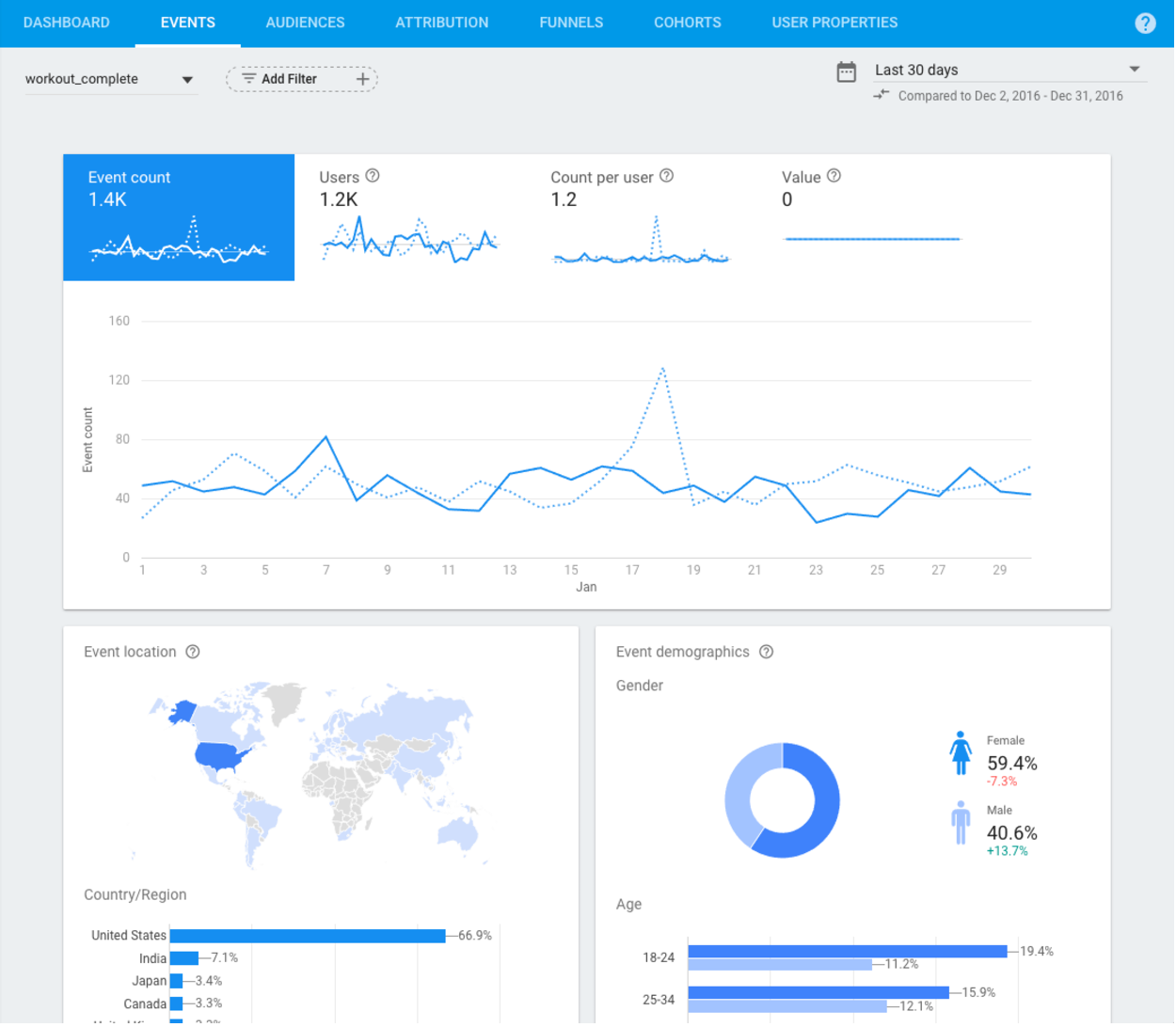
Firebase Dashboard
| Supported Platforms | Pricing | Pros | Cons |
| C++, iOS, Unity, and Android | A/B Testing, Analytics, App Distribution, App Indexing - Free (Spark Plan) Authentication, Cloud Functions- Paid (Blaze Plan) | Crashlytics, Google Analytics, Hosting, Cloud Messaging, Authentication, easy to implement | Not enough analytics on user engagement, limited customization |
2. Adobe Analytics
Adobe Analytics helps you to get started with your dashboard by providing you flexibility with configuring the dashboard. You can configure the metrics, dimensions according to what you want to see in the dashboard, and create multiple dashboards. Not just that, but it also provides pre-set templates for different types of projects. For example- you can just drag a template 'Content Consumption' for a website to track your application's performance. Its templates can be further tweaked towards what you want to see. Its dashboard is easy to use as you can simply drag and drop metrics or components to experiment and visualize the data.
It provides real-time reporting for your applications. You can track page views, fallouts, entry and exit pages, time spent, event tracking, funnels, conversions, campaign tracking, and more with adobe analytics. Although, once implemented adobe analytics provides detailed data to help improve your application but implementing adobe analytics is a tedious task.
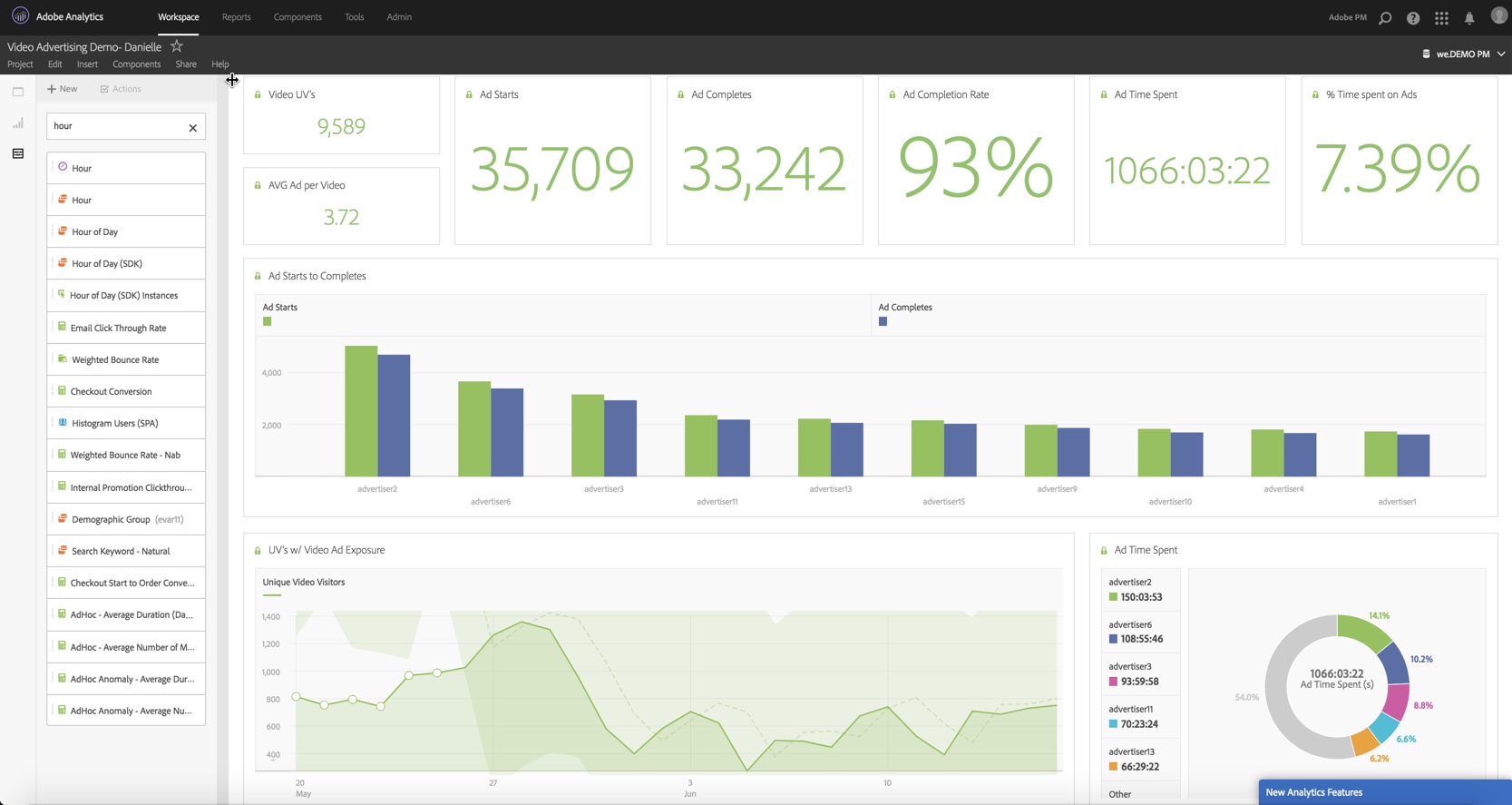
Adobe analytics
| Supported Platforms | Pricing | Pros | Cons |
| iOS, Android, JavaScript Browser for Desktop and Laptop, OTT devices for ROKU, AppleTV, FireTV, and Android TV | Paid, no free version available | Customizable Dashboards, Entry-Exit pages, User Journey, Templates | Not easy to implement, Expensive |
3. Mixpanel
This mobile app analytics tool helps you identify the power users, their behaviors, and how they interact with your application to help identify sources to improve user engagement. Interactive reports help you to visualize data quickly by drag and drop. Cohort analysis, funnel analysis, engagement tracking, customer segmentation, A/B testing, customer journey mapping are some of the key features of Mixpanel.
Mixpanel has an Addiction report which helps to identify how frequently your app is used by the users throughout the day or in other words it helps to identify the stickiness of your app.

Mixpanel
| Supported Platforms | Pricing | Pros | Cons |
| iOS, Android, Web | Free and Paid, start with $25/month, Free Trial available. | Training material, easy to access and set up, downloadable reports | Sync issues |
4. Amplitude
Amplitude is an analytics tool similar to Mixpanel and offers web and mobile app analytics solutions. It helps in measuring user behavior, user journey, high power customers. Identify retention and conversion drivers by measuring how users engage, convert and retain. You can measure both product and marketing metrics but it takes some time to fully understand this tool. It is very easy to set up and has customizable dashboards.
A/B Testing, Cohort Analysis, Funnel Analysis, engagement tracking, customer segmentation are some of the useful features for product managers.
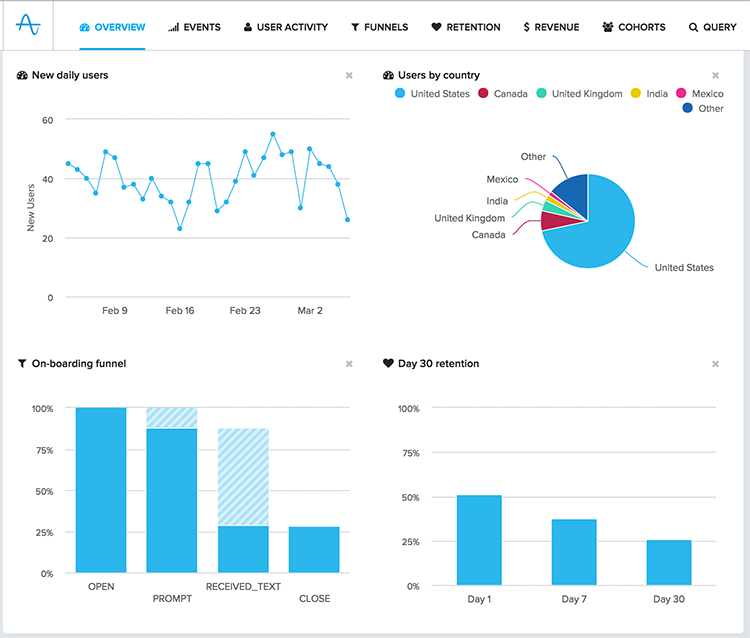
Amplitude
| Supported Platforms | Pricing | Pros | Cons |
| iOS, Android, Mobile web, and desktop website | Free and paid, no free trial | Easy to set up, configurable dashboards, User guide, Templates | Takes time to learn, No API |
5. Flurry
Flurry is a professional-grade software that provides analytics solutions for android and iOS free of charge. Its solutions are focused on acquisition, attribution, conversion, and retention. You can improve user acquisition by understanding your users, segmentation, and then optimize acquisition campaigns. It helps to identify the source of new users and their behavior. Thus, you can optimize your user acquisition efforts by performing deeper analysis on newly acquired users by channel, advertising campaign, or referral source. Analyze the conversion funnel to understand the user drop-off and determine where to optimize. To retain users, you can easily monitor session length, session frequency, and time spent per cohort.
It can be set up easily with Flurry SDK. It also comes with crash reporting to help developers debug the crashes.
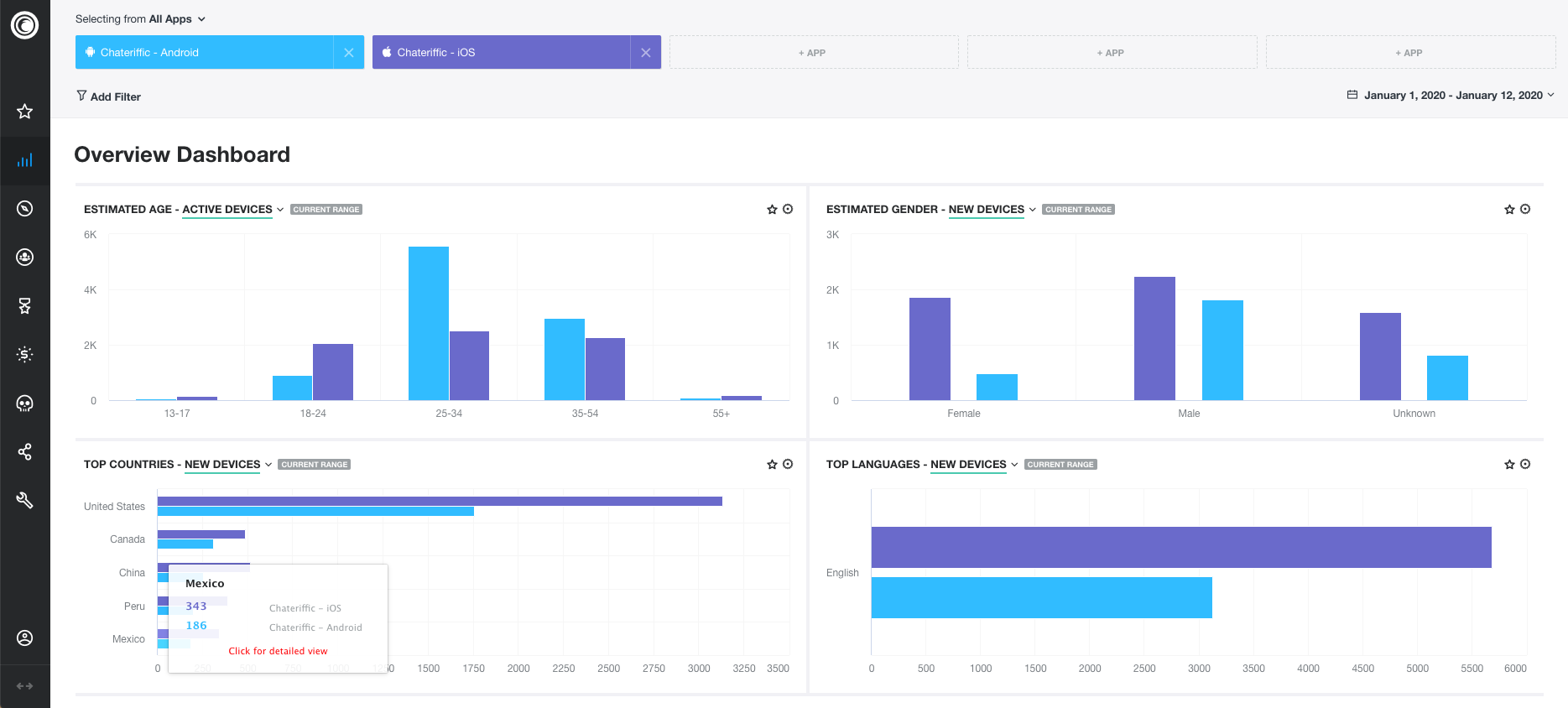
Flurry
|
Keep reading

Analytics & Metrics
Analytics-driven product prioritization
Shortlisting the features which need to be built and ensuring the resources are being utilized to provide maximum value to the customer in the shortest possible time is product…
Mar 28, 2024 · 10 min read

Analytics & Metrics
Top 10 mobile app KPIs for every product manager to measure
Top 10 mobile app KPIs which every product manager needs to be aware of and measure consistently to improve customer satisfaction
May 15, 2021 · 5 min read

Tools & AI
AI Tools In Product Management
Artificial Intelligence is being adopted by many industries to increase productivity and efficiency. Product managers are also finding ways to use AI to work faster and deliver better quality.
Jul 22, 2024 · 7 min read